The focus of this workshop was to develop the ability and understanding of how to navigate through a space in Adobe After Effects using an ‘Active Camera’ function.
The subject of this particular video was completely of personal choice, where we were expected to bring hand-rendered initial sketches and some quotations. These were then to be scanned in, later becoming the main content of this workshop task.

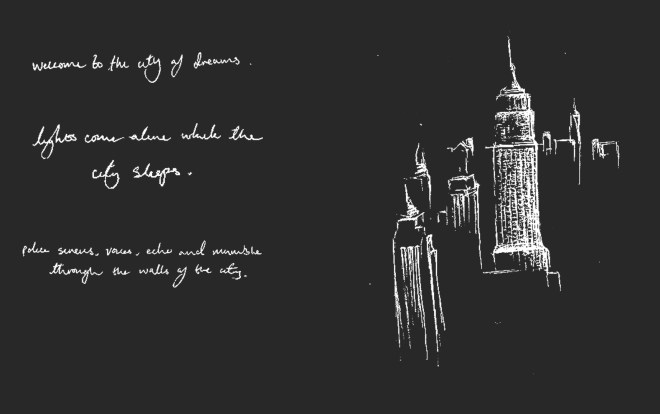
Image above documents an initial sketch and some hand-rendered type.

I then digitally manipulated this image using Adobe Photoshop, inverting the colour to evoke stronger, and bolder contrast. Also, individual elements were spaced across numerous layers to ensure these could be edited separately in After Effects.
The outcome of this workshop; This task prompted exploration of Z-space, active camera, 3D layers, as well as the implementation of an alternated viewpoint.


Initially, each layer with different components from my sketch was converted to a 3D layer. This enabled for the ability to manipulate and alter Z-axis, and therefore their individual placement in the given space.
As the second stage, an active camera was installed, providing the potential to direct viewpoint and navigate around the scene. The above, right, image shows how this attribute was constructed in relation to other components in the scene; stacked on top of each other on different z-axis values.

The ‘point of interest’, ‘position’, ‘depth of field’, and ‘zoom’ options were changed accordingly to personal intent. This enabled for the camera to move through objects to reveal detail, and depth in the scene. ‘Zoom’ was toggled to ensure that the camera could move at a sufficiently throughout all aspects, finally reaching the background where the animation reaches an end point.
On reflection and review of this workshop, I have learnt how to use active cameras in After Effects, along with how to use some of the controls and options this brings. I have learnt about z-space and have obtained an understanding of how to use such 3D axis’s for effect. I particularly struggled initially, when getting the camera to move smoothly through the scene, yet managed to overcome this by using the stop watches to vary values.
If I was to further develop this video, I would incorporate a background, adding further depth and improving associable ideologies, as well as aesthetic qualities.
 K.Hughes Graphics